So verbindest du Shelly-Geräte mit der Svea App
Um Shelly-Geräte mit Svea zu verbinden, musst du dein Shelly-Cloud-Konto mit Svea verknüpfen.
Das bedeutet auch, dass du neue Shelly-Geräte, die du mit Svea nutzen möchtest, zunächst in der Shelly-App einrichten musst. Bitte verwende die Shelly-App und folge den Anweisungen zur Einrichtung eines neuen Geräts.
Verbindung von Shelly-Steckdosen und -Relais mit Svea
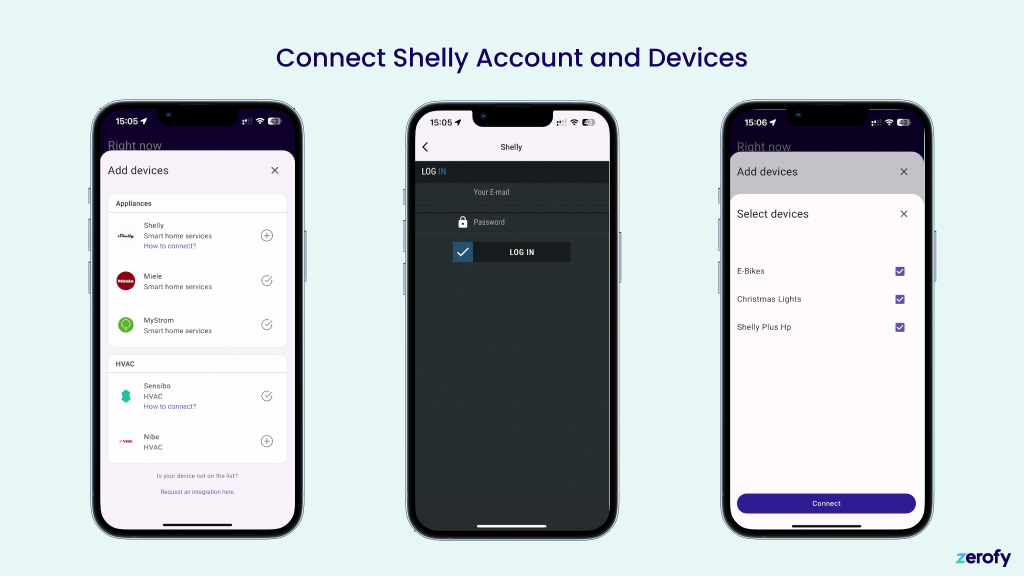
Die Verbindung von Shelly-Steckdosen und -Relais mit Svea ist einfach:
- Tippe auf den Shelly-Bereich unter „HVAC und Geräte“
- Gib deine Shelly-Zugangsdaten ein
- Wähle das Gerät aus, das du mit Svea verbinden möchtest
Verbindung von Shelly Pro 3EM Energiezählern mit Svea
Der Ablauf ist derselbe wie oben für Steckdosen und Relais beschrieben. Allerdings startest du in der Sektion Zähler in der Gerätekonfiguration der Svea App. Der Gerätauswahldialog zeigt dir dann nur Shelly Pro EM Zähler und keine anderen Geräte deines Kontos an.
Zaehlertyp
Hauptzaehler: Netzzaehler. Kann als bidirektional oder als Verbrauchszaehler konfiguriert werden.Produktion: Misst die Solarproduktion. Als Unterzaehler mit Typproductionkonfigurieren.Unterzaehler: Misst beliebige Geraete als Unterzaehler und erscheint im Geraeteverbrauch.
Weitere Details mit Screenshots findest du unter Systemeinrichtung: Zaehlerkonfiguration.